
We are testing a new "Optimization (Beta)" feature designed to improve game performance, especially on devices with lower specifications.
If you would like to participate in the test and see whether the game becomes faster, smoother, and more stable, follow the steps below.
How do I enable "Optimization (Beta)"?
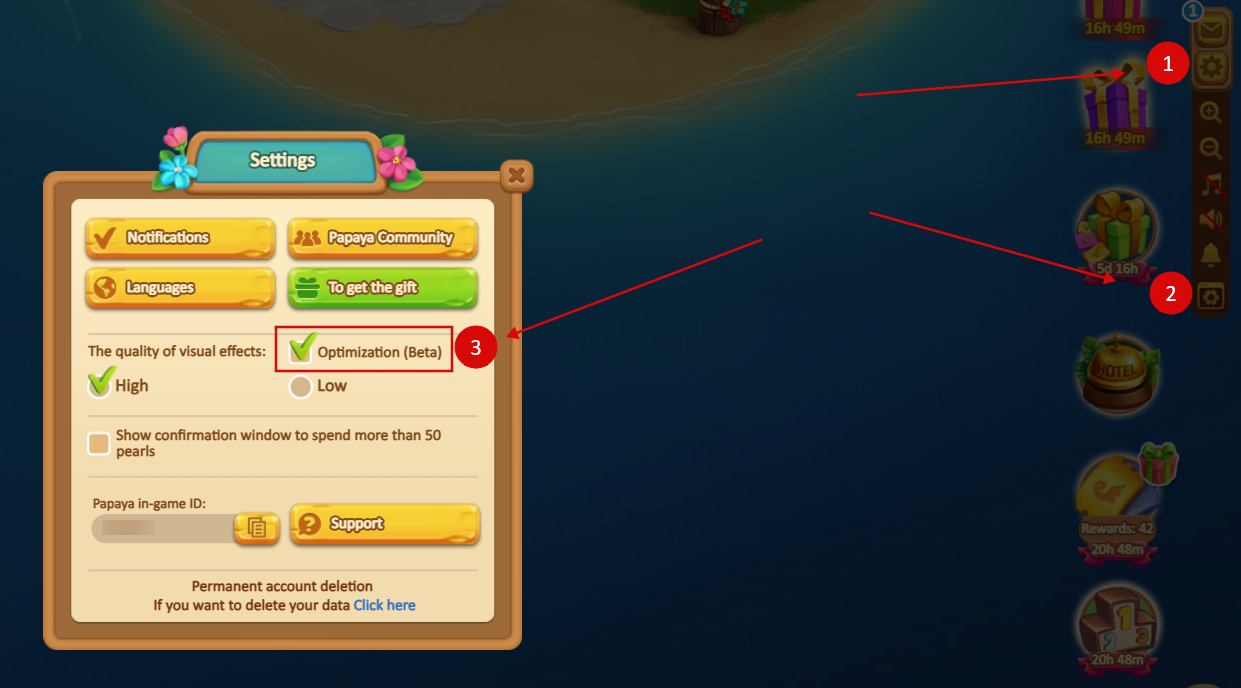
- Open Settings.
- Go to Advanced Settings.
- Enable Optimization (Beta).
What does this feature do?
"Optimization (Beta)" is a test feature that we are evaluating to improve game performance across different devices. It may help reduce lag and provide a smoother gameplay experience.
Since the feature is still being tested, results may vary depending on your device.
How do I disable the feature?
If you would like to return to the previous settings, open:
Settings → Advanced Settings → Optimization (Beta)
and disable the option.
Why should I participate in the test?
Your feedback helps us evaluate the effectiveness of the new optimization and improve the game for everyone.